
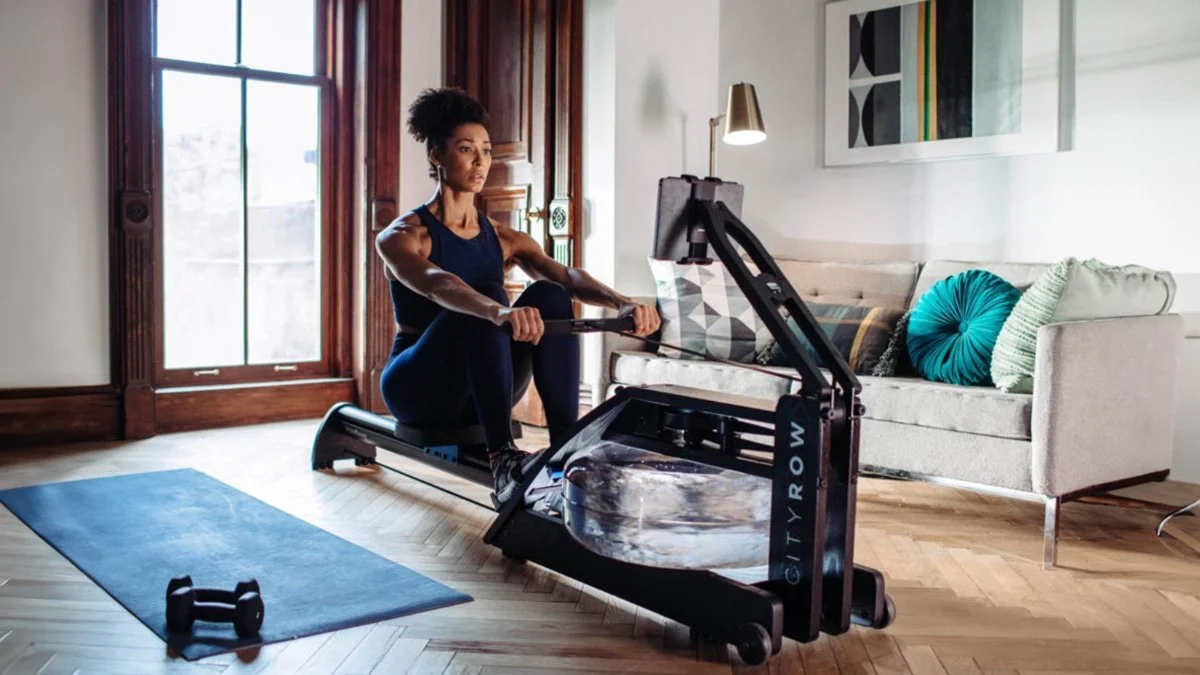
If you’ve been eyeing the CITYROW experience but you already own a WaterRower (or you’re planning to), the CITYROW Connect is the “grown-up” way to do it: you’re essentially upgrading your rowing setup into a connected training system—without buying an entirely new connected rower.
And yes, it’s a legit upgrade… with one important detail that trips people up:
This is an upgrade kit. A rower is not included.
So let’s talk about what you’re actually getting, what you’re not getting, and who this upgrade makes the most sense for—especially if you’re building a home gym with longevity in mind.
What is the CITYROW Connect upgrade?
Think of CITYROW Connect as the “brain + studio” layer that sits on top of a compatible WaterRower setup.
At the center is their 19.5” sweat-resistant touchscreen with high-fidelity speakers and a 30° adjustable viewing angle. The screen is designed to bring CITYROW’s class library into your space—training programs, coached rows, off-rower workouts, the whole deal—while showing your stats in real time.
And quick naming note (because it is confusing): CITYROW has rebranded some model names, but the tech hasn’t fundamentally changed—the “Max” tablet and the “CITYROW Connect Tablet” are described as identical and still receiving firmware updates.
First, the big clarification: what’s included (and what isn’t)
What you do get
19.5” sweat-resistant touchscreen
30° adjustable viewing angle
High-fidelity speakers
Access to classes and data features with an active subscription
What you do not get
A rower. (Seriously—this is the most important sentence in this entire post.)
The ComModule attachment may be sold separately (this can matter depending on your existing setup).
Designer translation: this is not “unbox and row.” This is “upgrade your current rower system into a connected ecosystem.”
Compatibility: will this work with your WaterRower?
CITYROW lists the upgrade kit as compatible with specific WaterRower configurations—examples include:
WaterRower S4 (with ComModule attachment)
WaterRower S4 BLE
CITYROW Classic / WaterRower A1 BLE
If you’re not sure what monitor version you have, this is where people waste time and money. Before you buy, confirm your model/monitor compatibility so you’re not trying to “make it work” later.
The experience: why this upgrade feels different in real life
Here’s what I like about it from a luxury-home perspective:
1) It turns rowing into a routine, not a “nice machine you walk past”
The screen is the compliance factor. It reduces friction. You’re not propping a device up, you’re not messing with angles, you’re not squinting at a phone. It’s integrated and intentional.
2) It supports longevity training—not just cardio punishment
When people tell me they’re designing for longevity, what they usually mean is:
they want something they’ll actually do consistently
they want variety (cardio + strength + mobility)
they want to track progress without making it a whole “project”
CITYROW is built around that studio/coaching structure and data streaming (with subscription).
3) Apple Watch integration is a nice touch
Not a dealbreaker, but in a longevity-focused setup, it’s one of those small details that makes the system feel complete.
Subscription: do you need it?
You can row without the subscription, but the experience becomes very limited. There’s typically a “Just Row” mode for real-time stats, but without a subscription you lose tracking/progress features.
CITYROW also promotes subscription pricing around $29.99/month or $299.99/year, and the upgrade kit is often offered with a short free trial window, cancel anytime, with access tied to an active subscription.
My honest take: if you hate subscriptions on principle, don’t buy an upgrade whose value is the connected platform. Buy a beautiful rower and keep it simple.
Warranty: what’s protected (and for how long)
The tablet is generally covered for one year, while WaterRower coverage is commonly described as five years on the frame, three years on non-electronic components, and one year on electronics/tablet.
That’s a pretty standard split: long coverage on the structure, shorter coverage on the electronics.
Space planning tips (so it looks intentional, not “gym stuff everywhere”)
This upgrade is visually dominant because the screen is large. That’s not bad—just plan for it.
My layout advice:
Give the screen a clear sightline (don’t tuck it behind a plant, please).
If you do off-rower work (strength/mobility), position your mat where the viewing angle actually works with that 30° tilt.
Treat the rower like a furniture piece: lighting matters. A warm sconce or art light nearby makes the whole thing feel “designed,” not accidental.
Who this upgrade is for
Buy the CITYROW Connect upgrade if:
You already own (or plan to own) a compatible WaterRower and want the connected studio experience.
You want an all-in-one screen setup instead of piecing together a phone/tablet solution.
You’re building consistency into a longevity routine and you like coached structure.
Skip it if:
You don’t want subscriptions (the best features require one).
You thought you were buying a rower (you’re not—rower not included).
Your WaterRower setup isn’t compatible (confirm this before you commit).
Bottom line
CITYROW Connect is a real upgrade—it turns a beautiful rowing machine into a connected training system with a serious screen, real coaching, and a more polished “this belongs in my home” experience.
Just go in with eyes open:
it’s an upgrade kit
a rower is not included
and the subscription is what unlocks the value